




LG QNED 90 T
The TV is great for watching shows in a bright room, but you may find a better mini-LED or even an LG OLED for around the same price.
The LG QNED 90T does a lot of things well enough, from an easy install to good picture quality with nice contrast, but it doesn’t feel all that exceptional compared to the slew of other mini-LED TVs on the market today.
Reviewed at $1,900 MSRP (65-inches)
Pros
Easy setup and sturdy build
Good contrast overall
Game dashboard works well for quick console gaming
Cons
The menu UI doesn’t feel all too modern
Base HDR settings require too much fiddling
Doesn’t have that much to offer over comparative OLED
If it’s unclear by now, TV makers are trying to sell you on mini-LED. What about OLED? Well, it sure is nice. LG has its own G3 model, which we consider one of the best TVs you can buy right now. But those are expensive, both to make them and for consumers who buy them. So yes, mini-LED. It’s bright, and with extra quantum dot technology, it can present a great picture for significantly less than OLED. So, here comes the QNED 90 T, a refreshed QLED with an LG twist. Can the company come up with something as renowned as its organic light-emitting diode displays?
Yes and no. It feels that instead of leading the pack as it does with OLED, LG hasn’t managed to gain much ground when it’s surrounded by some strong competitors. My review unit 65-inch QNED 90 T sported pretty deep blacks and good color contrast, and while it won’t overshadow OLED it’s still a solid second choice. Still, I can’t say it beats most other TVs on any metric, let alone price. QNED is one of those alphabet soup technobabble terms, but all you have to know is it uses quantum dots and mini-LED tech akin to other QLEDs, but it also uses LG’s proprietary NanoCell layer, which works to boost colors you see on screen. Its excellent anti-glare capabilities make it a strong screen for a brightly lit room.
But does it look better than other QLEDs out there? To my mind, not quite. There’s such a razer’s edge difference between this 4K TV and something you could consider “higher end.” You’re first going to want to compare the LG to other QLEDs like Samsung’s QN90D, which starts at $2,700 MSRP at 65 inches, and it seems like a smart buy. The QNED 90 T is $1,900 MSRP at the same size. The problem is there are several other TV brands on a budget whose QLEDs boast better brightness and comparable colors to be on the lookout for in 2024.
The 90 T has a small positioning problem. Sure, it costs less than Samsung’s 4K Neo QLED, but a Hisense U8N UHD QLED will cost several hundred dollars less (and now there’s the U9N calling for consumers’ eyeballs with beefed-up brightness). Then there’s TCL, whose latest QD mini-LED TVs, like the QM8, boast better brightness for a comparative price.
LG feels a little stuck, and not the least, because its UI feels far more outdated, especially if you’ve spent any time with Samsung’s latest version of Tizen OS. Budget companies like Vizio have managed to completely reinvent its user interface, which is far more concurrent with today’s expectations. The QNED 90 T has everything you would need for a good TV for gaming, including 120 Hz refresh rates and enough HDMI ports for your console needs. Everything works, but it doesn’t feel as seamless as it should.
LG QNED 90 T Build Quality
It’s Sturdy, and Setup is a Breeze
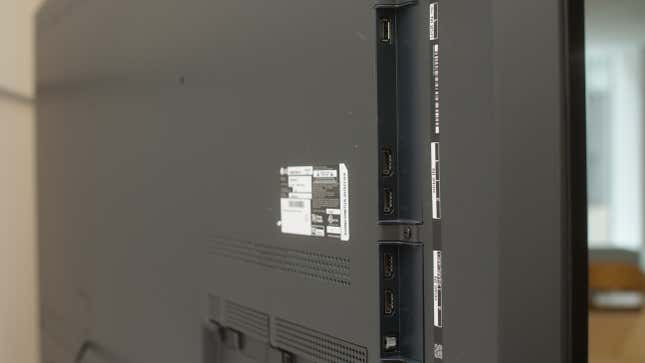
When you’re not hanging it on the wall, the QNED 90 T sets up with two L-shaped feet on either side of the screen about 60 inches apart. They may look a little thin at first glance, but I found them to be plenty sturdy once I had them on the table. I shook it a bit and didn’t hear any plastic strain or see much wobble. I still might prefer a single flat stand that makes it far easier to position sound bars or other devices underneath, but what’s in the box works well enough.
Once everything is plugged in, setting it up is pretty damn simple. The QNED 90 T asks you if you’ve mounted your TV on the floor or the wall and then if you want to turn on the AI Picture Pro and AI Sound Pro modes. The latter two ostensibly use the α8 processor to enhance the picture and sound of your device. Could I see much difference in picture quality with these features on or off? No, not quite. That’s whether watching SDR and non-4K content or HDR 4K movies. This TV also boasts it can upscale non-4K content to a higher resolution, but at this point, you should largely ignore any company making these upscaling claims. Whether I’m watching live broadcast TV or YouTube, there’s really no big improvement for older or lower-resolution content.
It only supports WiFi 5, which is a slight limitation on connectivity shared with other TVs lingering from this year’s CES. Still, it will support Bluetooth 5.1 and the LG remote app. The remote that comes in the box is fine, though I often get annoyed enough by the main selection button. It also works as a scroll wheel that brings up the air mouse when I least want it. Small nitpicks aside, there are enough ports here for most users, with two USB Type-A and 4 HDMIs.
LG QNED 90 T Menus and Usability
LG’s UI Could Use Another Makeover
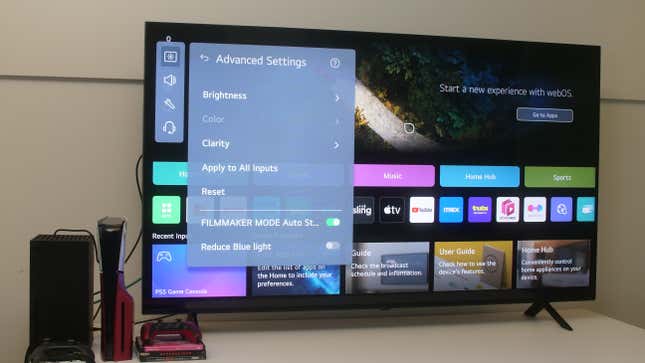
Right away, you’re introduced to the checkerboard LG menu, and that’s where my experience hit a snag. The top of the screen is emblazoned with a massive ad block, while the rest of what’s on offer is a jumble of separate apps, modes, inputs, and streaming services jumbled together across a “Service card” for different modes and a commonly-used app list. While there’s a handy button to return to your last used input device like a game console, every menu from “Games” to “Home Office” loads a completely separate app. I would much prefer being able to go between these modes seamlessly like you can on Samsung’s latest TVs, even if the options in most of these apps supply you with enough utility we’ve come to expect from these upper mid-range TVs.
By default, the Home Promotion bar across the top of the screen automatically plays audio if you hover over it with the air remote or accidentally scroll onto it. You have to dig deep into the Additional Settings menus and Home Settings in order to turn off both that and content recommendations. The screen is also set up in the default Eco HDR mode, presenting a far more subdued screen than you would want for any content. At the very least, the quick settings menu lets you change between these modes fairly easily, but that’s not the end of your setup journey.
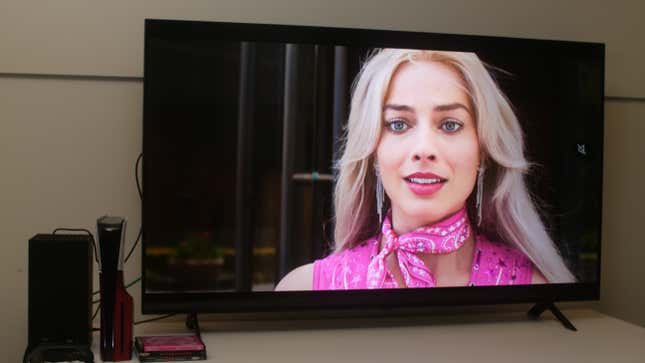
When selecting HDR, you’re granted the option to choose a “personalized” HDR mode. All that means is the TV will show you a bunch of pictures of rolling hills or a seaside town in Italy and ask you to pick out your favorite one. Based on your answers, it will choose an HDR mode for you. It seemed to think I preferred a “balanced” mode based on some esoteric algorithm, but it made the content of a film like Barbie Movie look far more yellow than it should. I turned it over to “Vivid” for a much brighter overall experience.
LG’s unnecessary frame smoothing TruMotion is, of course, on by default. You have to go through multiple menus—through Picture, Advanced Settings, and Clarity—to turn it off. Unfortunately, each HDR mode has its defaults, so you need to manually turn off TruMotion or other settings when you switch to each for the first time.
LG has also added an in-TV chatbot that should make fixing your menus easier, but I found it superfluous. You can ask it a range of pre-established questions that I found don’t actually do a good job of fixing the default TV settings.
I will give props to the TV’s built-in game optimizer, which brings the game’s current framerate and options for VRR, Black Stabilizer, and other options like AMD Freesync Premium. The QNED 90 T automatically detects when your console or PC is connected and will change to the game-specific HDR mode, which I didn’t feel the need to change off from on both Xbox Series X and PlayStation 5.
The “Netflixification” of TV menus has not gone unnoticed. Some folks might feel like everything’s getting very similar. Still, when you refocus menus to go more vertical, you also make more screen real estate available for the things that matter, like the content you actually want to watch. LG’s webOS menus are very horizontally oriented. Scrolling down past the first few commonly used apps brings you recommendations with what feels like a lot of empty, unused space.
LG QNED 90 T Picture and Sound Quality
Strong Picture Quality With Some Very Good Glare Tech
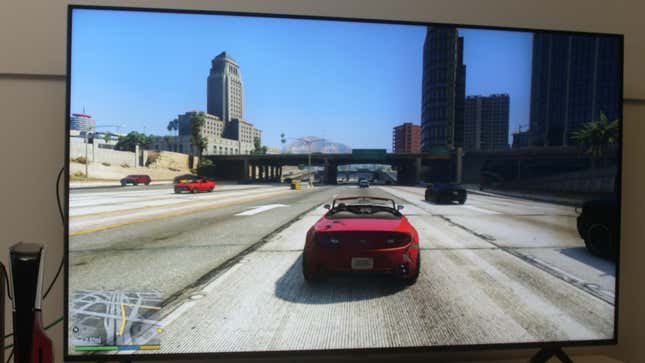
The best part of using the QNED 90 T was how well it adapted itself to my ugly office environment. Under glowing fluorescents and the natural rays from a nearby window, I didn’t experience any real glare or other distractions from the surrounding lights.
My 65-inch model is supposed to include max 160 local dimming zones (there are around 2,400 on the 86-inch QNED 99T model) and the TV did manage to suppress the dreaded “halo effect” or blooming that can occur on this type of display. You can manipulate the number of active dimming zones in settings to judge the contrast between lights and darks on screens, but I didn’t feel the need to change it from default. I didn’t spot any real halo-ing or bloom in my time with it, even during extra bright scenes. The TV really does a good job of displaying scenes with a mix of brights and darks, though in my experience, even with different HDR modes, I wasn’t too big a fan of scenes outside, where the subject could look a little more washed out than it should.
But that’s a very small nitpick, and your regular TV power user might disagree with my assessment. While TruMotion should be universally turned off on every new 90 T, you might still find some use for the Motion Pro, which should reduce motion blur. While I spotted only marginal improvement with the feature turned on, I personally found it a pretty nice feature you won’t see on every new TV.
The 65-inch and 75-inch versions of the QNED 90 T are VA panels, which means they are vertically aligned backlit crystals on an LCD display. VA panels are known for producing some pretty solid deep blacks, though that also has a trade-off in total viewing angles. LG promises you shouldn’t see any difference in color accuracy within 30 degrees of the front of the screen, but after that, you may experience some slight issues.
Despite that, I didn’t see too much change in color or blooming when I was watching the screen from various angles. As for sound, well, it’s just fine. The TV supports Dolby Atmos but won’t blow the hat off your head with rather minimal bass from its 40W, 2.2 Channel speaker. It gets the job done, but if you’re already investing close to $2,000 on a TV, you probably owe it to yourself to get a soundbar at the very least.
The LG QNED 90 T is a Good Buy, But Not Best in Show
I would hold up the QNED 90T as one of those TVs you get because you already like LG, you know LG, or if you get a good deal on it. Compared to its OLEDs, which remain some of the best, the mini-LED is pretty good. That’s a hard bargain in 2024, when every company is pushing QLEDs for less than LG. It might be worth it to wait and watch for the reviews on other TV makers like Hisense and TCL can meet or beat the QNED 90 T. If you’re truly jonesing for the upgrade, then maybe you could opt for a slightly smaller G3 OLED for about the same price as the QNED. Maybe mini-LED will actually win out on big screens, but for now, the LG TV isn’t the end-all be-all.
Update 05/30/2024 at 2:29 p.m. ET: This post was updated to correct the number of dimming zones on the 65-inch QNED 90T to 160 compared to the QNED 99T.
