




Lenovo Legion Pro 7i Gen 9
The Lenovo Legion Pro 7i gaming laptop does everything you would want, and even a bit more than that.
With all the bells and whistles in all the right places, the Lenovo Legion Pro 7i is the kind of laptop you can expect will handle everything you could possibly want and still surprise you. It’s a bit too big and heavy to consider truly portable, but the Gen9 laptop is cooking with power thanks to high-end Intel CPUs and up to an RTX 4090. Its screen is solid though maybe a bit mundane for its price, and yet it’s so easy to think of the laptop as your go-to device for at-home gaming or even some regular work tasks. It starts at $3,220.
Pros
Great performance across the board
Keyboard feels nice and laptop itself is sturdy
Extra features like numpad don’t detract from overall quality
Cons
Screen is bright and fast but relatively mundane
Not the lightest or most-portable gaming laptop
The Lenovo Legion Pro 7i 16 comes close to having practically everything you could want or need in a gaming laptop, almost to the point of excess. There may not be many folks out there who demand numpad controls on a mobile device. Why? Because why not? The only thing it’s missing is an SD card slot. Knowing just how many things have been shoved into this beast of a laptop, I’m honestly surprised by its absence.
The dream for gaming laptops is, eventually, we’ll find one that comes with the “everything but the kitchen sink” of features, power, battery, display, and portability. In a lot of ways, this latest version of the solid Legion Pro series comes the closest to that dream. My version of the 9th-gen Legion Pro 7i 16 came with an Intel Core i9-14400HX, a Nvidia GeForce RTX 4080 with 12 GB of GDDR6 VRAM, and 32 GB of RAM. It’s stuffed with power. And while it still doesn’t feel as much like a brick as I first assumed, it’s not going to fit in my backpack’s laptop holder thanks to that rear shelf behind the screen. It won’t overheat even after hours of gaming, but when set to performance mode the fans may start to sound like a Boeing jet deposited yet another turbine next to my window after the company’s latest botched takeoff.
Typically, the more power you put into a laptop, the more you’ll start to see the concessions and compromises, but what’s great about the Legion Pro 7i is that none of it ever feels like too much to bear. It has a great keyboard and a nice, bright LCD screen that can also push 240 Hz refresh rates for all those titles that require you to maximize framerates to “pro” levels. From the back, it doesn’t look too garish, but inside you’ll still find a full RGB backlit keyboard with a host of fun preset or custom lighting effects.
With specs like these, you’ll Inevitably draw a comparison from the Legion Pro 7i to the Razer Blade 16. The big momma of all gaming laptops comes with an OLED display that also pushes 240 Hz and goes for $4,000 with the RTX 4080 and just 1 TB of storage. Compare that to the Legion Pro 7i’s $3,220 MSRP with two 1 TB SSDs. You might find some deals that will drop the price of both machines, but at base, it’s still a good deal.
At 16 inches, you might also want to look at the Alienware m16 R2, which is a much more portable laptop that still puts out fair frames at sub-$2,000. You could opt for a big boy like the 18-inch Alienware or the upcoming Razer Blade 18 for even more screen real estate, but when the Legion Pro 7i works so damn well at 16 inches, I don’t personally see much reason to go big unless you’re dedicated to keeping your laptop in the same place most of the time. And yet, the Legion Pro is just a little too big and a bit too bulky to want to take with you everywhere compared to more compact gaming laptops.
Still, the Legion Pro does so well in all the necessary categories that it’s hard not to recommend. It’s probably the best laptop at its price point, and that’s because Lenovo’s laptop feels so nice to use you can ignore any niggling issue that rears its head.
Lenovo Legion Pro 7i Build Quality
Keeps Cool and Looks Cool
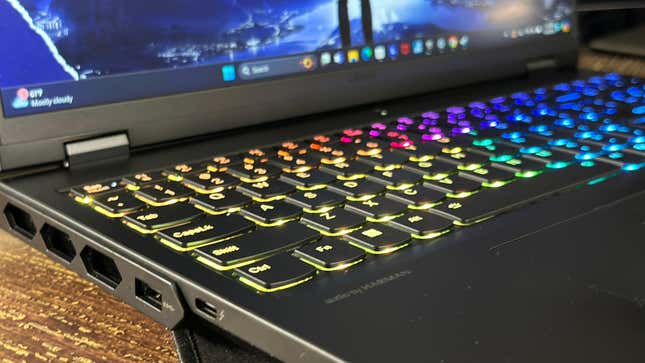
Looking at it from the shell, the only thing that gives the Legion Pro 7i away as a gaming laptop is the large exhaust ports exposed in panels on the rear and flanks. It has a kind of diesel engine look to it that’s not apparent until you get close. That, and the glowing RGB light casting the classic gamer glow between yourself and the laptop might give you away if you’re trying to be low-key.
Still, it’s subdued enough that it could pass as a regular work laptop in a coffee shop, so long as you don’t forget to turn off the RGB using the slightly clunky Lenovo Vantage app that comes pre-installed. I wish there were a shortcut to turn off all the fancy lights like there is for the different thermal modes, but I personally don’t care if anybody’s watching me type on my not-subtle-at-all keyboard. The Lenovo Spectrum options offer more lighting modes than I’ve seen on many other gaming laptops. My personal favorites are the context-sensitive modes like “Type lighting” or “Audio ripple.”
The keyboard is definitely a standout. Lenovo calls this its “TrueStrike” keyboard, but all you really need to know is the keys are still large enough for my medium-sized mitts despite the full-sized numpad. The keys themselves have a fair bit of heft and 1.5mm of travel, which I found perfectly acceptable for both typing and gaming. The aluminum interior has a very small amount of give to it, but not enough that you’ll find your heavy palms sinking into the frame. Overall, the laptop feels sturdy, though I didn’t exactly find the trackpad anything to write home about. I’ve encountered a few instances of poor palm rejection, but there was nothing as bad as I’ve encountered on the Razer Blade.
It’s not heavy, but you will feel it if you have it pressing against the sides of your backpack. At 5.77 pounds, you won’t be holding it one-handed outstretched, and it will start to feel a little thick on your lap. It’s pretty thin for the scale of the PC at .86 inches, but the shelf adds some extra length and at 10.32 inches I found it pretty hard to pack. It’s all doable, but again the Legion will often remind you of the compromises for carrying around a gaming laptop versus a work PC.
During gameplay, when I have the fans going at full blast, I never felt the Legion Pro becoming unmanageable. The keyboard itself only ever registered about 98 degrees Fahrenheit around the WASD keys. The fan vents on the sides closest to the screen registered between 115 and 125 in some places, but other than making your desk a bit toasty it never impacted performance. All in all, the Legion was consistently the ol’ reliable I could depend on whatever the circumstance.
Lenovo Legion Pro 7i Performance and Battery Life
Handles Anything You Can Throw At it, but It Won’t Last Long Unplugged
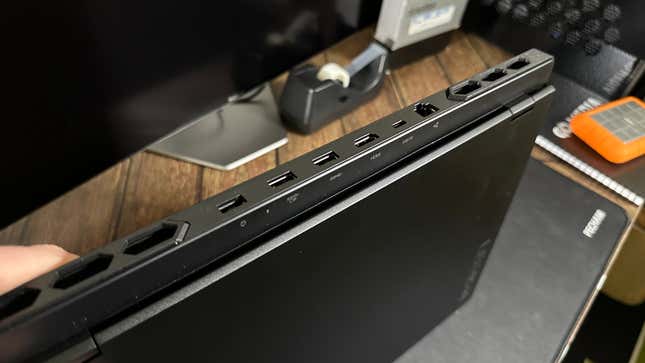
In my time with the Legion Pro, I never found there was a moment I couldn’t play the games I wanted on a minimum of high settings far beyond 60 FPS. Of course, that’s expected with an RTX 4080 in tow, but the HX-series Intel CPU is no slouch either.
Geekbench and Cinebench scores were about what I expected, meeting about 2800 in single-core and 16860 in multicore settings on Geekbench 6. On Cinebench it’s a similar story, and it’s clear that the Core i9-14400HX is also perfectly capable of rendering tasks. On our Geekbench test, where we time the computer as it renders a single image of a BMW, the Legion managed to finish in about 1 minute and 40 seconds, just slightly slower than a MacBook Pro 16 with an M3 Max chip.
With the specs, there are very few games available today that will give you any trouble. A title like Horizon Zero Dawn would easily hit over 100 FPS on the highest settings. Benchmarks in Cyberpunk 2077 pushed close to 100 FPS on the highest settings, and it could hit just above 50 when I turned on all the extraneous ray tracing options. I played some other titles like Suicide Squad Kill the Justice League and Warhammer 40K: Darktide and found no problems pushing my framerates well above 90 in both titles even when pushing most of the settings to their limits.
You won’t need all the Legion’s capabilities at all times, even for some select games. Lenovo Vantage also comes with the option to enter GPU Working Mode, which allows the PC to switch between the integrated GPU on the i9 or the RTX 4000 graphics card. You should probably have it on if you’re trying to get a bit more out of your rather minimal battery life.
There’s a reason beyond this laptop’s size and weight why it probably won’t become your on-the-go daily driver. During regular use, I’ve found it would last barely four hours before going into low-power mode and begging for a charge. I could squeeze out some more juice on lower power settings while turning off a few unnecessary features and lowering brightness, but off-cable I found I couldn’t even get to lunchtime without finding an outlet nearby. At the very least, the 330W brick that comes with the laptop offers fast charging, and I could get it back to just under 100% in around 40 minutes. That’s using the proprietary port on the back of the Legion. It does support USB-C charging up to 135W but don’t expect the same charging time on the smaller cable.
Lenovo Legion Pro 7i Display
An Ultra-Fast Screen That’s Plenty Bright, Yet it Feels a Bit Too Mundane
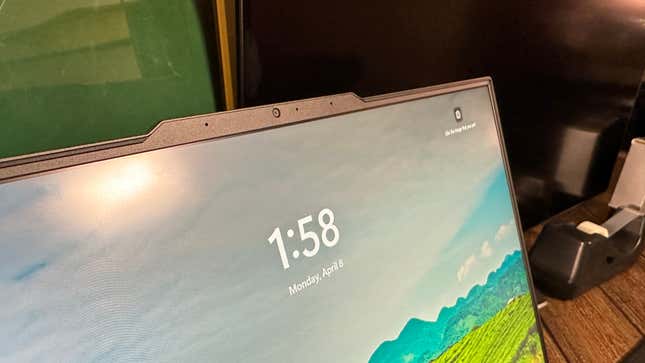
The Legion Pro’s IPS LCD 16-inch display capps out at 2560×1600 resolution, which is fair for its size but I wouldn’t call it the prettiest screen I’ve had the pleasure of viewing on a gaming PC. Thankfully, it’s still very bright. Lenovo declares its screen’s peak brightness is 500 nits, but I recorded it at a full screen of 520 nits. That’s pretty fair, and it doesn’t look bad by any stretch since it supports Dolby Vision along with a few added features like G-Sync.
The main selling point is still the 240 Hz monitor if you can lower the settings to reach that refresh rate in the first place. Would I prefer a slightly better-looking display with a lower refresh rate? Probably, but I also imagine an OLED display would bump up costs by several hundred dollars, so I’ll take what I can get. You can also fold out the screen a full 90 degrees if that really matters to you.
The bezels aren’t as small as possible, but they’re fairly good for this size of laptop. The webcam up top is an FHD camera at 1080p. It’s fair enough, though it’s still grainy under my office’s fluorescent lights. The camera does come with a physical button to turn it off on the side, but no specific shutter on the camera itself. Perhaps that’s due to how it’s positioned as a notch that also acts as your means for cracking open the laptop.
There’s So Much to Like About the Legion Pro 7i
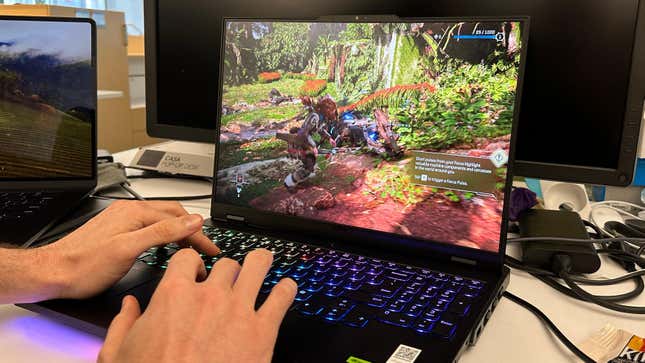
While reviewing the Legion Pro 7i, I found myself so comfortable so often that I started actively trying to look for issues. But there’s really not much to complain about. The 2024 edition of the Legion Pro feels damn good, and there are so many goodies packed inside you feel like you can handle anything they throw at you.
But again, all gaming laptops are a compromise to some degree, the Legion Pro 7i just manages to mask those challenges better than most other mobile devices on the market. It still doesn’t have good battery life, and the display is bright yet a little too mundane even with 240 Hz refresh rates. And then there are a few features that might feel a bit unnecessary, like the numpad. But I know there’s somebody out there looking for a full-keyboard laptop with the sort of power the Legion 7i is packing under the hood. If you’re looking for Razer Blade-level performance without the premium you pay for a Razer product, the Legion Pro 7i is a great compromise. Hell, if you just need the best all-around laptop you can get that’s also not a Mac, you won’t do much better than Lenovo’s 16-inch beast.
Want more of Gizmodo’s consumer electronics picks? Check out our guides to the best phones, best laptops, best TVs, and best headphones. If you want to learn about the next big thing, see our guide to everything we know about the iPhone 16.
